Most n8n agent tutorials end at the moment the agent "works". In practice, the important part starts later: what the agent may decide on its own, what it costs in API tokens, and what happens to a case it does not understand. This guide walks through all of it — using a request-handling agent as the example.
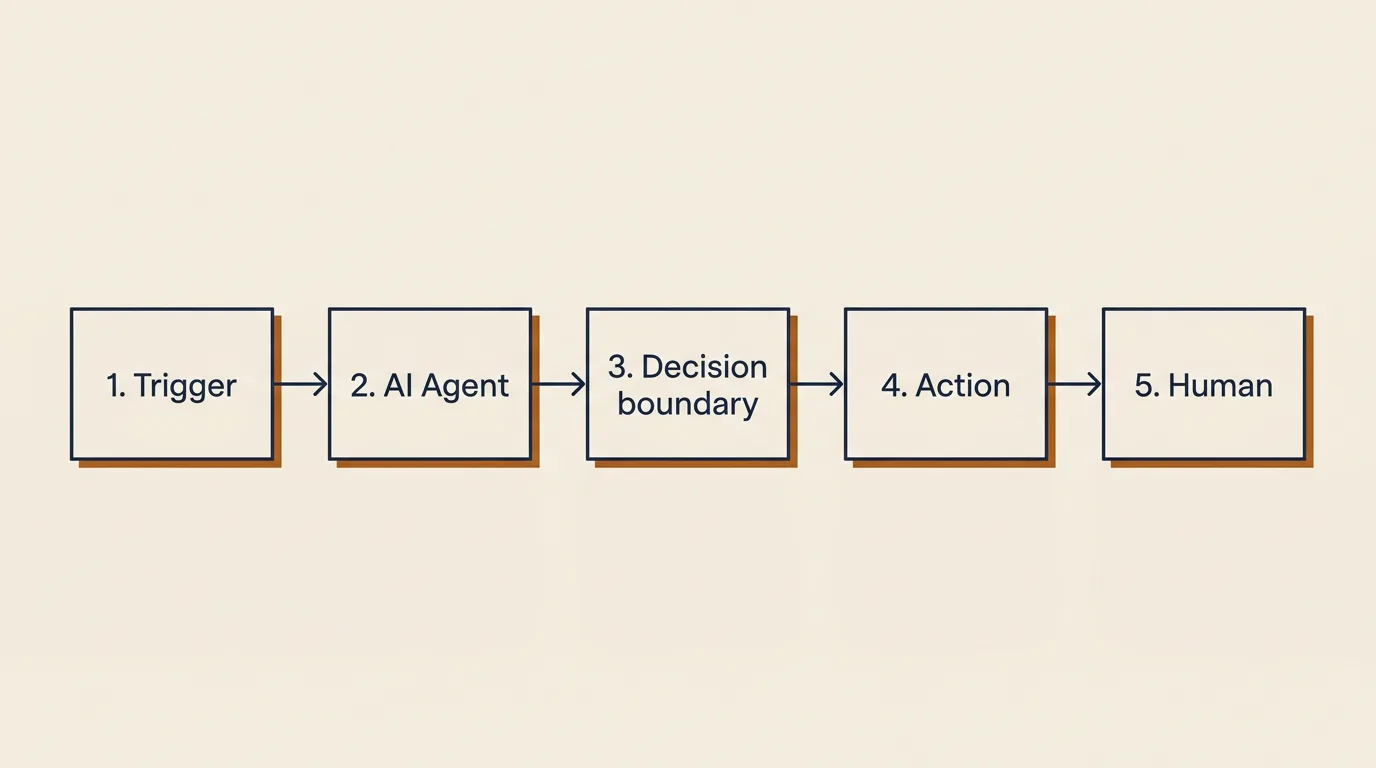
Before you open n8n: set the boundaries on paper
Nearly everyone skips this step — and it is what separates an agent you can trust from a chatbot set loose. Before placing the first node, write down three things: exactly what the agent may decide alone (e.g. "answers order-status questions and refunds up to $75"), how it recognises a case is beyond it (no match in the knowledge base, amount above the threshold, detected customer frustration), and who specifically receives an out-of-scope case. This is the core of what we call an agentic workflow.
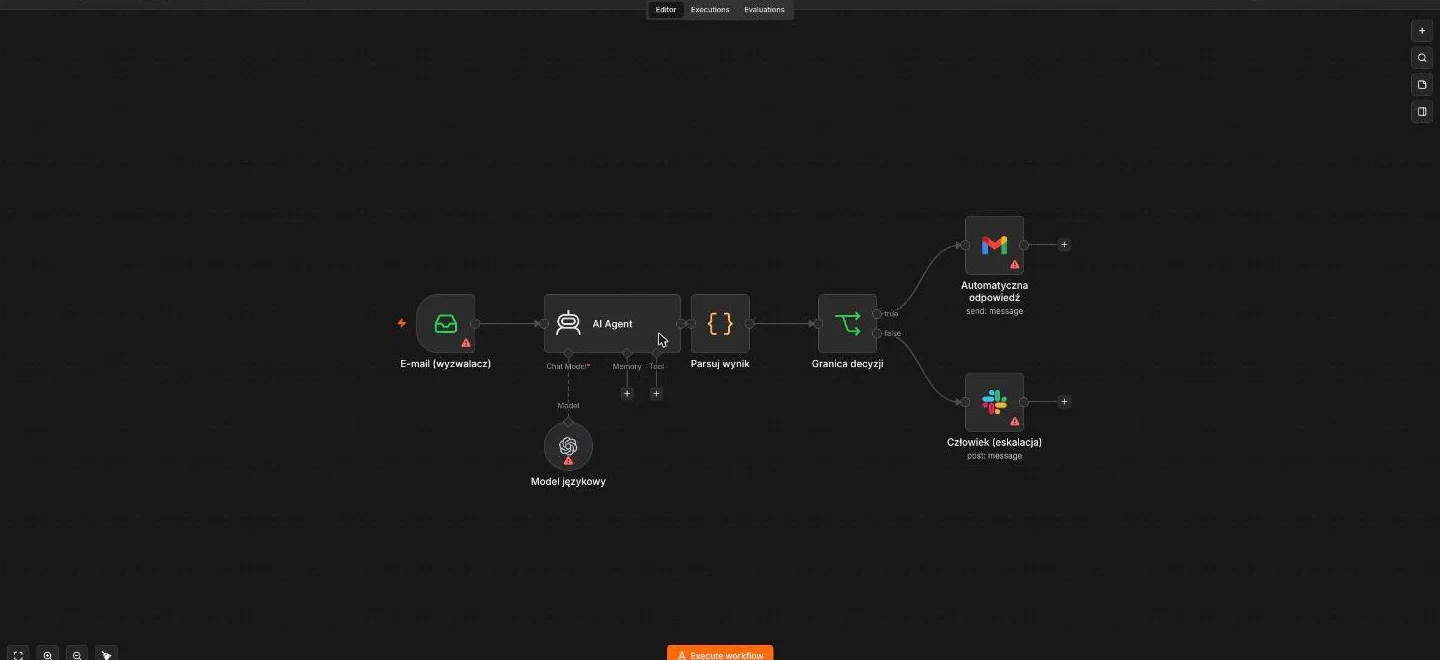
Step 1: the trigger
The agent needs to know when to start. n8n offers Email Trigger (IMAP), Webhook (forms, ticketing systems), app triggers (Slack, Telegram) and Schedule for recurring work. For request handling, an IMAP mailbox or a contact-form webhook usually does the job.
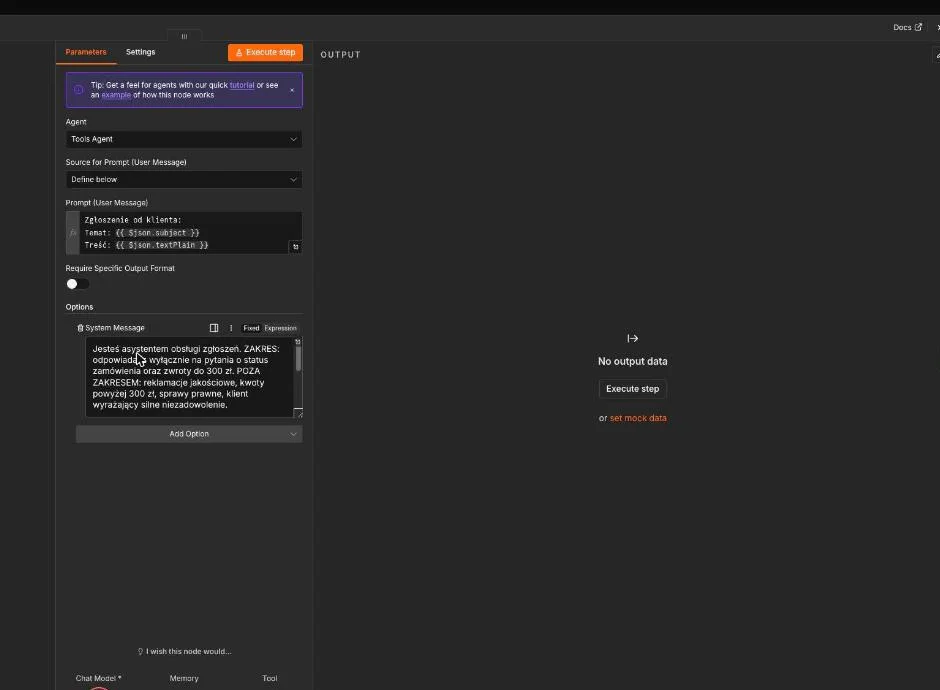
Step 2: the AI Agent node — model, prompt, tools
The heart of the flow is the AI Agent node, where you configure three things. The model — connected via credentials (keep API keys in n8n credentials, never inside node content). The system prompt — this is where the paper boundaries go: scope, tone, when to refuse, output format. Prompts that force structured output work best (e.g. JSON with category/confidence/reply fields) — downstream nodes can then make decisions on data rather than prose. Tools — tool nodes the agent may call: knowledge-base (vector) search, order status from the shop API, customer lookup in the CRM. Rule of thumb: give the agent only the tools its scope requires — extra tools degrade decisions and widen the error surface.
Step 3: memory — only if genuinely needed
n8n has memory nodes (conversation, window buffer), but request-handling flows often need none — each request is a self-contained case. Enable memory only when the agent holds a multi-turn dialogue with the same person. Unneeded memory means a bigger context, higher token costs and harder debugging.
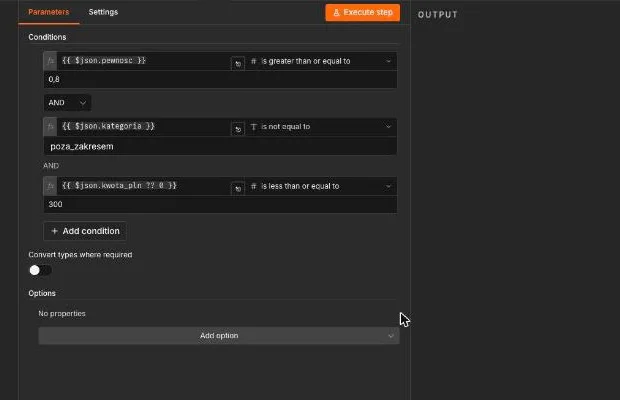
Step 4: the decision boundary — an IF node after the agent
Directly after the agent node, place an IF (or Switch) node that checks the boundary signal on the structured output: confidence below threshold? category "complaint"? amount above the limit? The in-scope branch goes to the automatic action (send the reply, update the ticket). The out-of-scope branch goes to the handover point.
Step 5: the human handover point
An out-of-scope case must reach a specific person with full context: the original message, what the agent worked out, why it stopped, and a proposed draft reply. In n8n that is a Slack/email/ticketing node. For "a human approves before anything goes out", n8n has nodes that pause the flow pending a decision (Wait/approval) — during the pilot phase it is worth routing all agent replies that way, as we argue in our piece on human-in-the-loop in agentic workflows.
What it costs in practice
Agent cost = the n8n server + model API tokens. You do not count the server twice (you already run it for n8n). Tokens depend on the model and context length; classifying a request and drafting a short reply typically costs a fraction of a cent to a few cents per execution. Practical advice instead of theoretical tables: run a one-week pilot, read the cost meter in your model provider's dashboard, and only then decide on scale. The second cost lever: different models in different nodes — a cheap model classifies, a stronger one writes replies for the hard cases.
The three mistakes we see most
- An agent without boundaries — a prompt saying "answer customer requests" with no scope and no boundary signal. Great in the demo, silently broken on the exceptions.
- Prose output instead of structure — downstream nodes have nothing to decide on, so the boundary is checked "by eye" or not at all.
- Handover without context — a "request needs attention" ping instead of the full history. The human reads everything from scratch anyway, and the savings evaporate.
Frequently asked questions
What does it cost? Server + API tokens; with hundreds of requests a month, usually tens of dollars or less. Read the real number off the provider dashboard after a week of piloting.
Which model? Cheap and fast for classification, stronger for reasoning — n8n lets you mix models within one flow.
How to do human-in-the-loop? An IF node on the agent's structured output plus an escalation branch with full context; for pre-send approval — flow-pausing nodes.
The finished workflow, ready to import
Every step above is assembled into one importable n8n workflow — AI Agent node, structured output, a decision-boundary node (confidence ≥ 0.8 AND category in scope AND amount ≤ 300 PLN) and human escalation carrying full context. Download the file and load it via Workflows → Import from File; all that remains is connecting your own credentials for the mailbox, the model and Slack.
Download the workflow (JSON, n8n) — the file contains no keys and no personal data; every credential is attached on your side.
Not sure n8n is the right tool for your process at all? Start with What is n8n — what it does and when NOT to choose it, and practise boundary design with Designing an agent workflow for ticket handling.